
Best Business Mileage Tracker Apps in 2026
Using the best mileage tracker app is important for mileage deductions and tax filing. Especially when the Internal Revenue Service (IRS), wants you to record your mileage. Since your phone is used for mileage tracking, the wrong app can cost you thousands in tax savings. We've compiled the best mileage tracking apps and their features to help you find the one for you!
Cost Per Year
Free Unlimited Tracking
Receipt Scanner
Includes 5 users
Direct Tax Filing
Works Offline
Easy Expense
MileIQ
TripLog
Driversnote
Hurdlr
Everlance
Best Business Mileage Tracker Apps
- Easy Expense - Best for free expense and mileage tracking
- MileIQ - Best for simple mileage tracking
- TripLog - Best for large organizations and fleet drivers
- Driversnote - Best for accurate mileage tracking with iBeacon
- Hurdlr - Best for freelance or self-employed drivers
- Everlance - Best for rideshare drivers
These reviews are mainly based on the mobile app versions and not the web apps (website). All mileage trackers reviewed have the following features:
- Automatic mileage tracking (GPS)
- Manual mileage tracking
- Mileage reports
- Custom vehicles
- Favorite locations
- Cloud storage
Easy Expense
Best for free expense and mileage tracking
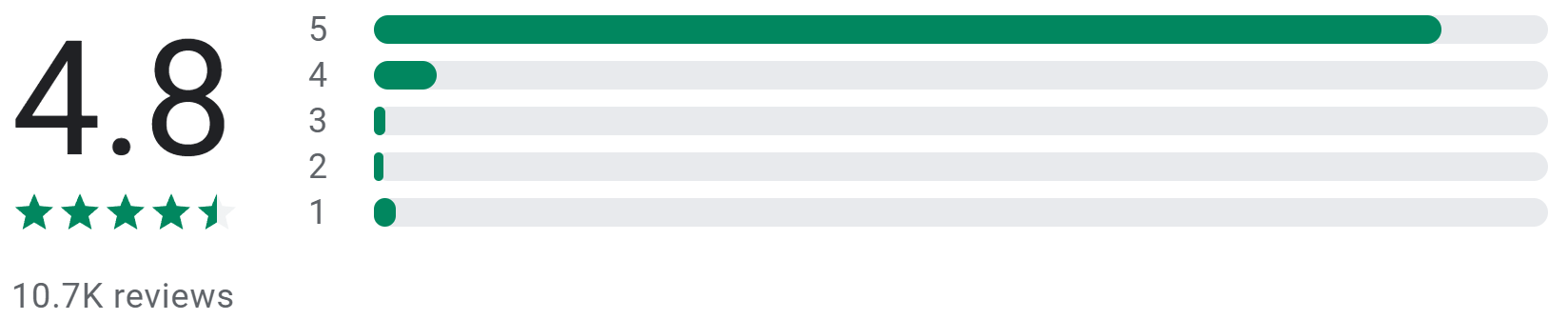

Heidi Butau

June 3, 2023
The Easy Expense app has
simplified my budgeting experience, and I highly
recommend it. It's incredibly user-friendly. I love
that I can add categories and merchant details without switching windows,
making it super convenient. The reports feature has made
me more organized than ever before. I used to dread
looking at my finances, but now I enjoy it. The best part is the
amazing customer support. They are prompt and go above
and beyond to help. Overall, Easy Expense has been a
fantastic tool.
19 people found this review helpful

Mya Liya
April 12, 2023
So far I really like the app. I've used it for a
year when I started using it to track mileage. I like that I can go in
later and add travel dates that I didn't get to do on the day I
traveled. I'm recently trying the receipt scanner which
works very nicely overall though sometimes I have to
correct information but that is easy to do. I'm hoping it's easy
to see all possible deductions in one place versus non deductions but
I've not found that yet.
56 people found this review helpful
Matthew Langley

April 8, 2023
It is pretty good overall. It always seems to get the
total of a receipt correct, but sometimes I have to enter tax manually
(which is mainly what I started using it to track). It seems to have
difficulty with tax when it's labeled as food tax due to a different
rate or with digital receipts, possibly due to it not being next to the
total.
50 people found this review helpful
Overview
Easy Expense is a powerful expense and mileage tracker for individuals looking for a free alternative. If you need access to premium features, there are affordable plans making it perfect for small businesses, independent contractors, and self-employed freelancers. Easy Expense has a simple interface to streamline mileage and expense tracking to save you time and money.
Key features
- Accurate trip logging: Logs trips for you as you drive from point to point
- Bank syncing: Sync your bank accounts to scan for expense tax deductions
- AI receipt scanner: Auto crops, extracts, and categorizes your receipt to maxmize your tax deductions
- Simple and detailed reports: Create mileage and expense reports for easy reimbursement or tax filing
- Team collaboration: Track mileage and expenses as a team with different levels of access
Pros
- User-friendly interface: Easily record your expenses and mileage with a few taps
- Simple trips: Log trips with saved and suggested locations to reduce data entry
- Fully customizable: Create your own mileage rates, vehicles, vendors, categories, and much more
- Add multiple businesses: Keep your business or personal expenses separate to reduce clutter
Cons
- Web app in development: Some features are limited to the mobile app
- No fuel (MPG) or odometer tracking
Pricing
- Easy Expense’s free plan includes unlimited manual expense tracking for solo users
- Individual subscription plan is $74/year for unlimited mileage tracking and reports
- Team subscription plan is $144/year up to 5 users (only one subscription needed), with custom seat pricing for larger businesses

MileIQ
Best for simple mileage tracking
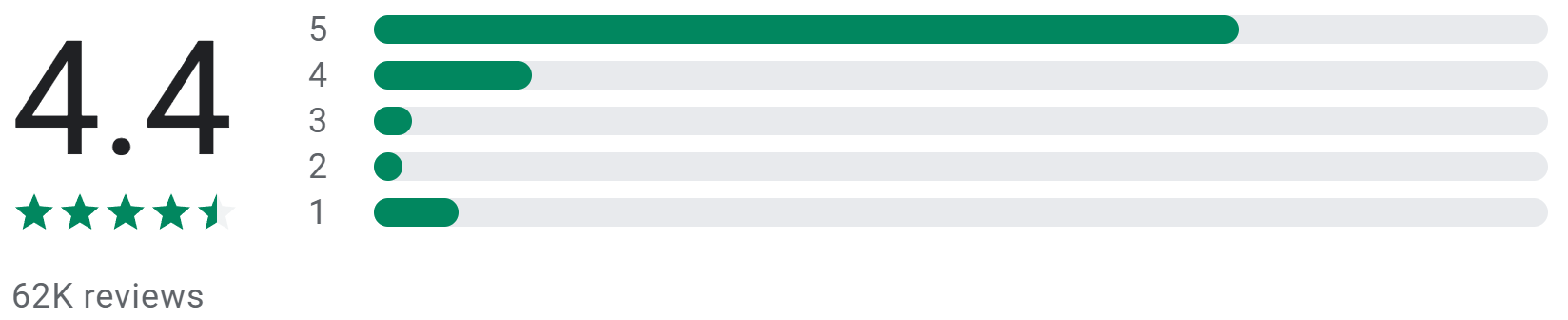

Kevin Koch

July 24, 2023
App was once great. For past year or so, while it still tracks most
drives, it's super buggy. Notification icon is invisible, & when
I open the app to classify drives, it says 100% classified, even though I
just got a notification to classify my drives. I have to click screen
randomly multiple times until my unclassified drives finally display.
It's super annoying. I've contacted support about invisible
notification icon multiple times to no avail. I'm a subsciber and
feel they just don't care.
4 people found this review helpful

Frank Infante

July 16, 2023
1) It works well but not great. It seems to think that when you stop for a
red light, it's a destination. So even though you actually went to a
specific end point, of you stop at 2 lights then it shows as 3 trips. 2)
It does not seem to recognize the Bluetooth connects so instead of
adjusting the primary based on BT it just assumes the primary car. 3)
Because of 1 and 2, it would be nice to select the multiple stops and make
them into one trip. A quicker way to change the vehicle.
8 people found this review helpful

Bonnie Keyes
July 7, 2023
I'm a petsitter and use it to track mileage from job to job. For the
most part it's easy to use and works well. I like that I can add
customized purposes. I didn't give it 5 stars because I wish it had
an "end trip" option to override auto detect. If I quickly (1-2
mins) deliver supplies to job sites before heading home, the app considers
the whole route 1 trip. I have to go back and manually add individual
trips/purposes before deleting what the app tracked so the classification
is correct.
13 people found this review helpful
Overview
MileIQ is an automatic mileage tracker strictly for mileage tracking. It features a swipe mechanic to classify trips as personal or business, making it ideal for those who are looking for simple mileage tracking.
Key features
- Swipe classification: Swipe left for personal and right for business
- View trips by date: See an overview of your driving
- Mileage tracking for teams: Track your employees' mileage with custom reimbursement rates
Pros
- One swipe classification: Swipe left or right to review trips
- Has a section to classify trips: View trip classifications between business, personal, and unclassified
Cons
- Limited report and emailing options: Can only email reports to yourself by month or year
- Can't set mileage rates: Has to be done through the web app
Pricing
- MileIQ's free plan includes 40 drives a month and free manual trip tracking
- Individual plan is $59/year for unlimited drives
- Team plans range from $50-100/user/year

TripLog
Best for large organizations and fleet drivers
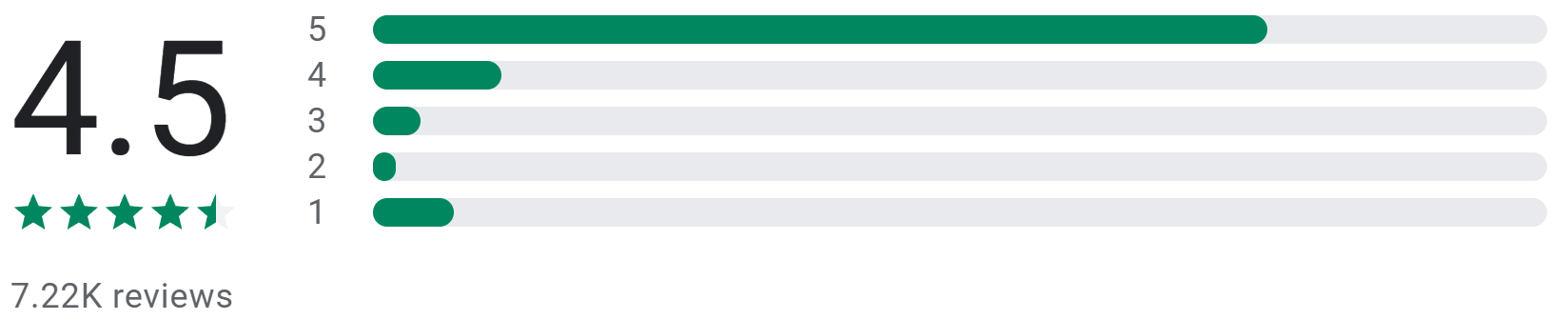
Mobile Device
July 24, 2023
This is the best mileage tracking app I have ever used. I use the iBeacon,
& it works great. Their customer support is top notch, & they
respond quickly through the chat feature inside the app. I had an issue
once that it wasn't connecting properly to the iBeacon. I went into
the app settings in my phone > storage >& cleared cache &
data. That immediately fixed the issue. I recommend backing up your app
data to the cloud first then pushing it back to your phone after you clear
the cache/data.
1 person found this review helpful

jeff garman

July 20, 2023
The app alone worked decent. I "upgraded" to the "Triplog
Drive" recently. It is sporadic at best. The accuracy is dismal. Its
been off by as much as 20% (high) on some trips. Pretty poor being that
its a GPS device. The autostart doesn't always work. It will start a
trip just by opening a door to retrieve something. Make sure you monitor
that its working. Kinda opposite of why I upgraded. The selector button
doesn't always work either. Very disappointing.
5 people found this review helpful

Jessie Grimmitt
July 10, 2019
I've been using triplog for about a year. I first started using it
with a vehicle that had Bluetooth and had zero issues with it connecting.
I started using it with another vehicle and found it wasn't
automatically differentiating between the two vehicles. I did reach out to
customer support they suggested I get a second plug in to use in the
vehicle that has Bluetooth. This was an extra expense and really
didn't seem practical for me. I now have it set to magic trip and
it's been working great
1 person found this review helpful
Overview
TripLog is a expense and mileage tracker with many ways to track trips at a large scale. With time tracking and scheduled shifts, they're great for large companies looking to automate employee mileage tracking.
Key features
- Multiple ways to track mileage: Track mileage with different devices to ensure mileage tracking accuracy
- Schedule shifts and dispatch: Plan your employees' driving and send them out as needed
- Reimbursement and expense approvals: Reimburse your employees for their driving expenses
Pros
- Employee tracking: Logs parked vehicle locations and driving so you know where employees are
- MPG and Odometer tracking: Track your driving expenses by the mile
- International tracking: Tiered mileage rates for other locations besides the United States
Cons
- Limited receipt scanner: Text recognition often fails and only extracts the merchant, date, and total
- No suggested locations: You must manually input addresses (unless previously saved) for manual trips
Pricing
-
TripLog's free plan includes 40 drives and free manual trip
tracking
- Individual plan is $59/year for unlimited GPS tracking
- Team plans range from $120-180/user/year

Driversnote
Best for mileage tracking with iBeacon
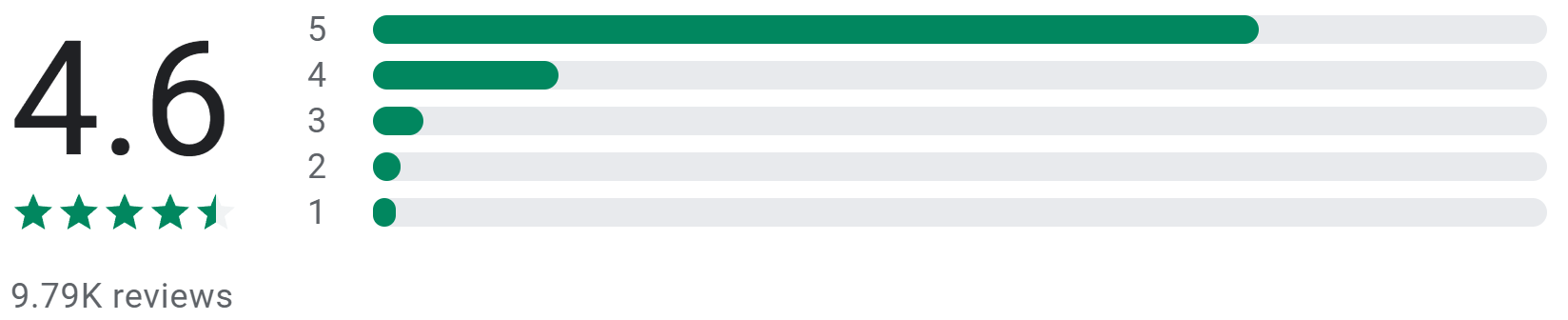

Eliott Davidson
May 24, 2023
Well-designed app that gets the job done efficiently and intuitively
without making a big deal of itself. My only complaint is that someone
really dropped the ball with the pricing structure. Among all the cool
bells and whistles rhat would make sense to charge for, they chose to
charge for... spreadsheet space. Not a satisfying perk. And at $14/mo for
the lowest tier, that potentially ends up costing nearly a dollar per ride
for users who don't surpass their free 15 rides by very much.
27 people found this review helpful

Customer Service
June 6, 2023
Absolutely the worst mileage tracking app ever. App uses well over 10% of
my battery everyday you have to have physical activity turned on so
they're tracking you when you walk through your own home not just
when you're driving your vehicle for work purposes. the price for the
app is considerably higher than other apps that do the same thing.
customer service is practically non-existent and the app specifically says
you can expect a reply in 24 hours that sure helpful, not.
25 people found this review helpful

Mara Alexander
April 15, 2023
This COULD be a great app, one I would gladly pay for, but it's
infuriating. I want to track trips manually (and after the trouble
I've had with trying to get to be ACCURATE with a manual trip,
there's no way I'd trust it to track automatically). I've
found workarounds, and honestly it's better than almost all the other
mileage trackers, but still infuriating. Support...is polite and tries
very much to be helpful...tries.
33 people found this review helpful
Overview
Driversnote is another simple mileage tracker that features an iBeacon device and AI classification for accurate mileage tracking and deductions.
Key features
- AI classification: Auto classify trips based on driving locations
- iBeacon: Starts tracking trips when your phone is near your car
- Log odometer readings: Manually log vehicle mileage as desired
Pros
- Route selection: Choose from multiple routes when adding trips manually
- Vehicle logging: Include vehicle details such as odometer readings and license plate number
Cons
- No custom mileage types: You can set your own rates but not the type of mileage
- Limited sharing options: You can only submit your report to your team or download them
Pricing
- Driversnote's free plan includes 15 free trips per month
- Subscription plans range from $132-156/user/year and includes a free iBeacon

hurdlr
Best for freelance or self-employed drivers
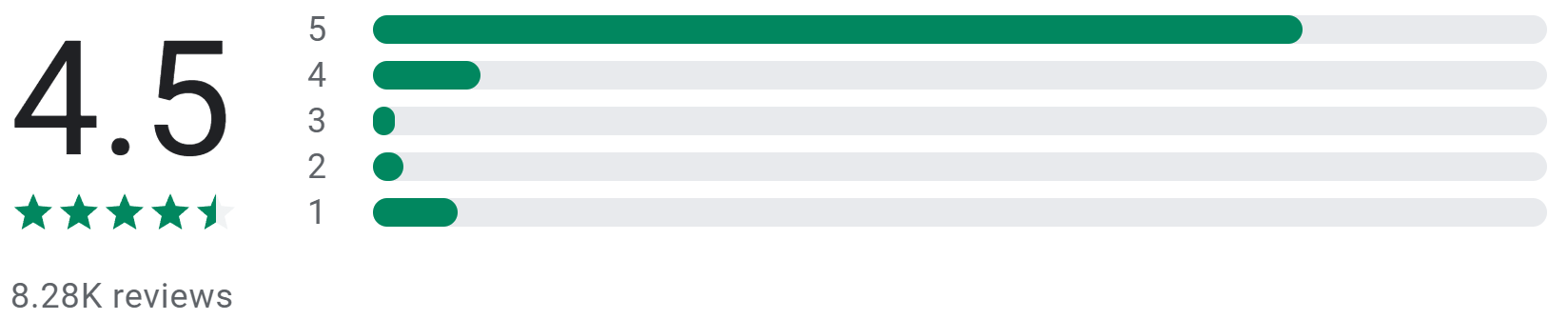

maladean hudson
July 21, 2023
I do like the program's feature of documenting my expenses. But,
since installing this app and paying for the premium version, my tracker
does not work it is inconsistent it stops working while I'm driving.
The representative informed me that they are aware that it is a problem.
While also being informed that it's important to check on the tracker
periodically to ensure that it is actually tracking my mileage. I've
decided I am going to uninstall this app and cancel my subscription.
1 person found this review helpful

David Lithway
June 12, 2023
Update - going on year 3. I love the auto track feature for miles and the
ability to break out expenses by different businesses and categories and
date ranges. I don't want to link certain things so end up still
having some manual work, but a good, easy to use system. Still 5 star imo.
Great way to simplify tax documentation. Using for almost a year and so
far happy. Tech support answers quickly. As we get towards tax season will
find out how easy it is to prep for my cpa.
6 people found this review helpful

Retro Voicedude85
March 4, 2023
This app is awesome, it's going to save so much time on my tax
preparation. Also, I like the feature where you can separate your business
from your personal, & even make notes in an area, so it can
differentiate, & divide all the miles into the correct category. In
addition, it calculates each group separately. In short, it's a great
app that I would recommend for everyone, because it's a lifesaver,
& a time-saver as well! 🙂👍
17 people found this review helpful
Overview
Hurdlr is a general expense and mileage tracker aimed towards self-employed freelancers. Unfortunately, they do not have a receipt scanner which makes them less ideal for expense tracking.
Key features
- Bluetooth mileage tracking: Track mileage in the most accurate and efficient way
- Speed Tagging: Combine multiple trips into one for easy viewing
- Time Tracker: Track hours worked on the job
Pros
- Multiple ways to self track: Start a timer for driving, working, etc.
- Start/stop tracking: Track mileage as you drive
- Tax Profiles: Track your estimated taxes and deductions
Cons
- No teams: Can only track as an individual
- No manual GPS or suggested locations: You'll must input trip details and distance
Pricing
- Hurdlr's free plan includes free manual expense and mileage tracking
- Individual plans range from $100-200/year

Everlance
Best for rideshare drivers
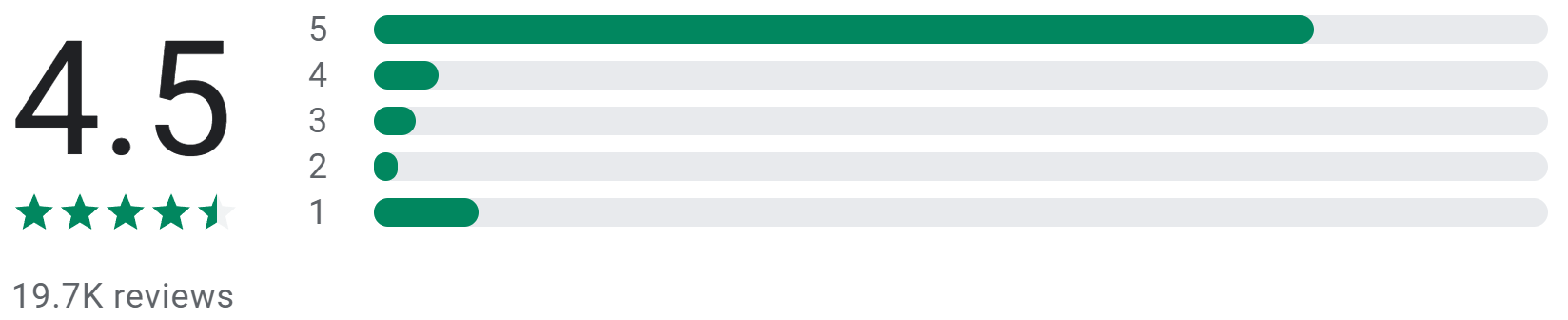

Thomas M Robarts
May 20, 2023
Having mixed results. Lately it's been crashing daily and the only
way I can fix it is by restarting the phone. Also there's no where
to insert starting mileage when starting a new trip, unless I'm
missing something you have to end the current trip before you can add a
note of what the starting mileage was. Also it doesn't allow you to
put in any information until after the trip is done..I don't really
get why. Yes I could add a trip.. id rather be able to start a trip and
label it ahead of time
10 people found this review helpful

Jim Sulley
May 25, 2023
Update, giving up on the paid version. Drops too many trips. Ones that I
have classified come back as unclassified and then trips the whole week
thing, Great idea but in the end if it doesn't track all trips,
what's the point? The app is ok, not great, not bad. You do miss
trips if you don't go in and classify your trips at least once a
week, which kind of defeats the idea of it tracking you trips so you
don't forget ones.
7 people found this review helpful

Cody Calvert
May 18, 2023
It has been an excellent experience so far. The swipe feature for
whether a drive was for personal or work is great, and it saves your
trips for when you forget to toggle it on. Very very good feature. I
have a subscription to this service and I don't regret it one bit.
This is one of the only apps I am currently paying for.
1 person found this review helpful
Overview
Everlance is great if you're driving for companies like Uber, Lyft, or DoorDash! Claim tax deductions on refreshments and snacks for your passengers with their expense and mileage tracking. With work hours, auto classify your trips when you're driving for business or personal purposes.
Key features
- Different GPS tracking styles: Log individual or long session trips
- Mileage tracker optimization: Ensures trips are accurately recorded
- Favorite trips and locations: Create trips quickly with saved data
- Track Revenue: Record incoming transactions as revenue either manually or automatically
Pros
- Set work hours: Auto classify your trips by setting the hours you drive for work
- Automatic reports: Expenses and trips classified as work are added to a report
- Customize your trips: Add your own vehicle, note, tags or driving purpose
Cons
- No receipt scanner: You’ll have to capture and input receipt data manually
- One mileage deduction rate: It’s not possible to have different mileage rates simultaneously
Pricing
-
Everlance's free plan includes 30 drives per month and free manual
mileage and expense tracking
- Individual plans range from $60-$120/year
- Team plans range from $120-$396/user/year
What to look for in mobile mileage trackers?
User-friendly interface
Since phone screens aren’t as big as laptops or computers, there’s less space to work with. Having an app that lets you do everything with minimal taps is a huge time saver. Imagine opening an app that requires you to tap five buttons before you can log a trip. It may not seem like a lot but as a self-employed or independent driver, your time is important.
Compatibility with different platforms
It’s disappointing when you’re about to buy an iPhone but the mileage tracking app you’re using only works on Android. Consider an app that works and syncs your data on Android, iOS, tablets, and computers.
Mileage rates and trip classifications
When it comes to filing taxes and tax write-offs, it’s important that your trips are categorized and tagged properly. It’s a pain when taxes are due and you have to sift through your trips to see which ones are tax-deductible or not. Having the correct classifications allows you to claim tax deductions efficiently.
Expense Tracking
Most mileage trackers will either have mileage tracking only or basic expense tracking for receipts. Often times, there will be expenses incurred when driving for business purposes such as car repairs or maintenance. Find a mileage tracker with a receipt scanner that extracts data for you.
How the mileage distance is tracked
From manual GPS locations to automatic mileage tracking, knowing how trips are tracked can reduce frustration. For example, some mileage trackers account for limited internet connections or multiple stops within a trip.
Data synchronization and backup
As we move towards a digital world, mileage logs are often stored on the cloud. It’s important that your logged trips are securely stored online and can be exported freely.
Reports and analytics
Seeing where your driving expenses are going helps you make smarter financial decisions and file taxes easier. Reports that summarize and itemize your tax-deductible driving make tax filing painless.