
Best Business Expense Tracker Apps in 2026
Although tracking expenses is generally helpful to see where your money is going, it’s crucial when it comes to business and tax write-offs. Whether you’re a small business owner or a self-employed freelancer, tracking business expenses allows you to remain tax-compliant, track spending, and maximize your tax deductions. With a mobile expense tracker, save time and money as you track expenses on the go.
Cost Per Year
Instant Receipt Scan
Add Unlimited Businesses
Includes 5 users
Direct Tax Filing
Works Offline
Easy Expense
QuickBooks
Expensify
Everlance
Zoho Expense
Best Business Expense Tracker Apps
- Easy Expense - Best mobile expense tracker app overall
- QuickBooks Online & QuickBooks Self-Employed - Best for small businesses and self-employed tax filers
- Expensify - Best for large organizations and business card spending
- Everlance - Best for automatic mileage tracking with simple expense tracking
- Zoho Expense - Best for business travel expense management
These reviews are mainly based on the mobile app versions and not the web apps (website). All expense trackers reviewed have the following features:
- Automated expense tracking (bank linking)
- Automatic mileage tracking (GPS)
- Expense reports
- Cloud storage
Easy Expense
Best mobile expense tracker app overall
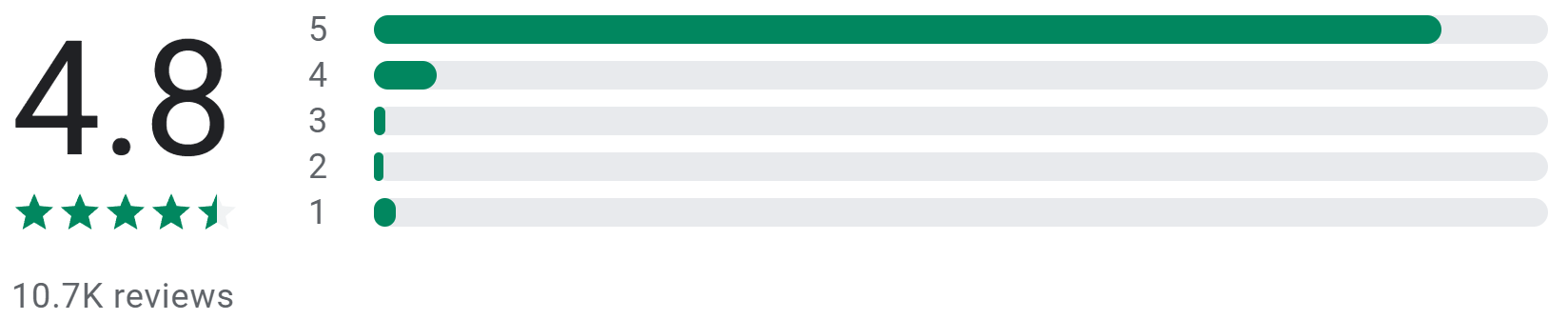

Heidi Butau

June 3, 2023
The Easy Expense app has
simplified my budgeting experience, and I highly
recommend it. It's incredibly user-friendly. I love
that I can add categories and merchant details without switching windows,
making it super convenient. The reports feature has made
me more organized than ever before. I used to dread
looking at my finances, but now I enjoy it. The best part is the
amazing customer support. They are prompt and go above
and beyond to help. Overall, Easy Expense has been a
fantastic tool.
19 people found this review helpful

Mya Liya
April 12, 2023
So far I really like the app. I've used it for a
year when I started using it to track mileage. I like that I can go in
later and add travel dates that I didn't get to do on the day I
traveled. I'm recently trying the receipt scanner which
works very nicely overall though sometimes I have to
correct information but that is easy to do. I'm hoping it's easy
to see all possible deductions in one place versus non deductions but
I've not found that yet.
56 people found this review helpful
Matthew Langley

April 8, 2023
It is pretty good overall. It always seems to get the
total of a receipt correct, but sometimes I have to enter tax manually
(which is mainly what I started using it to track). It seems to have
difficulty with tax when it's labeled as food tax due to a different
rate or with digital receipts, possibly due to it not being next to the
total.
50 people found this review helpful
Overview
Easy Expense is a powerful expense tracker that’s perfect for self-employed freelancers, small business owners, or business & personal expense tracking. Focusing on mobile app development, Easy Expense features a simple interface that streamlines expense tracking to save time and money.
Key features
- AI scanner: Auto-crops your receipt and extracts the vendor, category, tax, total, and payment method
- Auto categorization: Expenses are automatically assigned to maximize your tax deductions
- Simple and detailed reports: Generate expense reports (or custom reports) for easy reimbursement or tax filing
- Multiple workspaces: Manage multiple businesses or separate expense types with one account
- Team expense tracking: Track expenses together as a team with different levels of access
Pros
- User-friendly interface: Easily log your expenses and mileage with a few taps
- Instantly extract receipt data: Save time and reduce backtracking after scanning without the wait
- Loaded with customization: Create your own vendors, categories, mileage rates, and much more
- Spending & budget summaries: View overall spending for valuable financial insights
Cons
- Web app in development: If you mainly track expenses on the computer, there aren't as many features available
- No odometer tracking
Pricing
- Easy Expense’s free plan includes unlimited manual expense tracking for solo users
- Individual subscription plan is $74/year for unlimited receipt scanning and expense reports
- Team subscription plan is $144/year up to 5 users (only one subscription needed), with custom seat pricing for larger businesses

QuickBooks Online & QuickBooks Self-Employed
Best for small businesses and self-employed tax filers
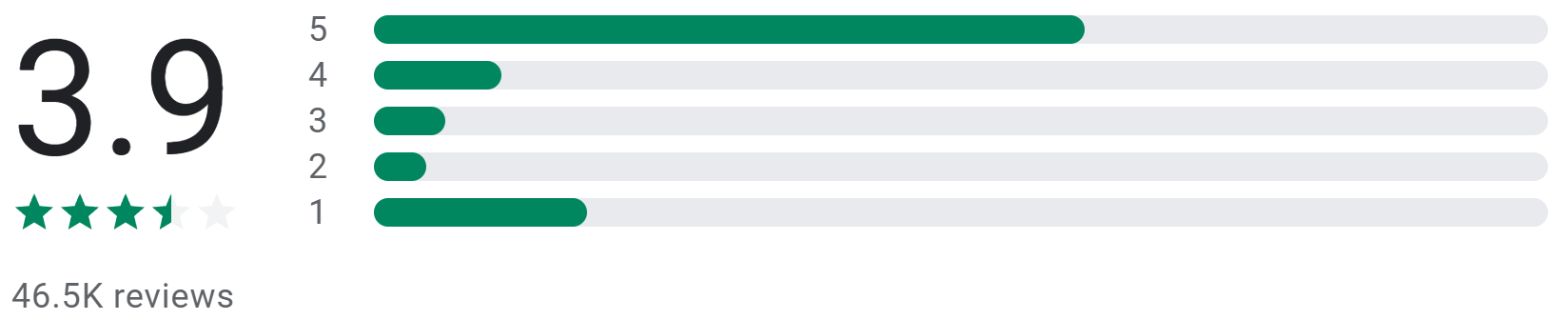

Charles Sellers

June 20, 2023
Bad functionality, keep not being able to access at least half of my
customers or open invoices on the mobile app, not able to see past
invoices for any of my customers. Bad mileage tracking, some times it
works some times it doesn't, usually it screws up at least the start
or end point. Kinda sad that a company like this is having these issues.
They didn't squash bugs with the update on the 13th they created
more!
3 people found this review helpful

David Santry
May 16, 2023
The app on my phone keeps turning off mileage tracking, and almost never
allows me to edit and send invoices. The web version has glitches and
faults as well. Most notably failure to record transactions that are
linked to credit cards or banks... the automatic recording of transactions
between linked accounts and an easy to use app on my phone are the very
reasons I signed up in the first place... and don't even get me
started on the fees.... you don't get what you pay for these days...
22 people found this review helpful

Vernice Joachim
April 15, 2023
Annoyed doesn't even describe it. When I started using the app it
never connected me to the subscription or anything so when the free trial
ended there was no way to go back and add it. Also it doesn't even
keep up with the money fast enough. There's about a 2 day delay to
the amount of money in your bank. You can't snap receipts from the
app either
49 people found this review helpful
Overview
QuickBooks Online contains features perfect for small businesses, while QuickBooks Self-Employed is more for individual contractors or freelancers. Their features revolve around maximizing tax deductions, tax filing, and financial business insights.
Key features for QuickBooks Online
- Invoicing: Create invoices and take payments
- Inventory tracking: Know what products you have available and the ones you need to restock
- Manage and pay bills: View your bills and make payments through QuickBooks
Key features for QuickBooks Self-Employed
- Invoicing: Create invoices and take payments
- Tax breakdowns: View quarterly or annual tax deductions and estimated tax burden
- Tax services: Export your data for Schedule C taxes and make quarterly tax payments through QuickBooks
- CPA help: Certified public accountants are available for tax advice and review
Pros
- Great for tax beginners: Be confident in filing taxes with access to CPAs and tax-deductible categories
- Profit and loss tracking: View trends and detailed reports to make informed business decisions
Cons
- No free plan: After a 30-day trial, you must buy a subscription
- Can be expensive: If you’re comfortable filing taxes yourself or have a CPA, there are cheaper alternatives
Pricing
- QuickBooks Online: Subscription plans range from $96-$360/user/year
- QuickBooks Self-Employed: Subscription plans range from $180-$420/year

Expensify
Best for large organizations and business card spending
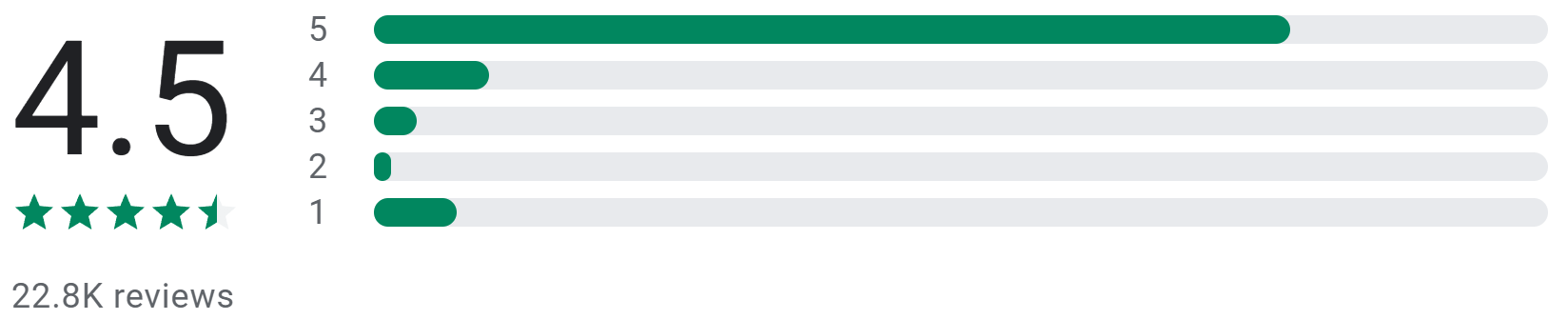

A Google user
April 30, 2019
At first, I had a little trouble getting the receipt scan to work right.
It turned out it was an account setting that my employer had defaulted to
off. Expensify email support responded within 10 minutes. Once past that,
the scan feature works well, and the receipts upload and integrate well
with the web site. So far, after a month of use, I have only had one
receipt scan the amount incorrectly. And in that case the receipt had two
different "totals", so you would not expect that. Expensify is
easier to use and streamlines receipt upload compared to Concur.
44 people found this review helpful
A Google user

April 10, 2019
Does a great job of capturing the receipt and creating a report - so it
gets a couple stars. OCR works decently (only a few errors on the 10
receipts that I uploaded). It will not, however, put the report in the
same order as your receipt images - there's no automated way to have
your list match your images. So what you end up with is a list of expenses
and all of your receipt images and you have to manually sort them.
Verified this through their online support. From their support: "It
is not random, but the order cannot be changed. " If you want to
spend time after you create your expense report putting the report in the
same order as your receipt images, then this is the software for you. If
you are looking for something "easy", keep looking...
55 people found this review helpful
A Google user
July 10, 2019
Very very good. Not perfect. Smartscan often misses obvious currency
indicators, which requires manual correction, but compared to entering
everything manually, it's fantastic. Saves me at least an hour per
month, probably more. Support team sometimes slow to respond (and
sometimes I feel like I'm chatting with a clueless bot) but they do
follow up and incorporate feedback and suggestions.
17 people found this review helpful
Overview
Expensify offers receipt scanning, mileage tracking, approval workflows, and business cards. With many features and integrations, Expensify is great for those seeking more advanced business and expense management.
Key features
- SmartScan: Extracts the vendor, date, currency, and total
- Approval workflows: Expense reports can be approved for reimbursement
- Business credit card: Track real-time spending with cashback on business purchases
- Payroll: Completely managed payroll services
Pros
- Receipt accuracy ensured: If receipt data can't be extracted, it’ll get flagged for human review
- Multiple approvers: Approve report reimbursements through multiple users
- Discounts and up to 4% cashback: Get cashback and discounts with the Expensify card
- Reimbursements and invoicing: Handle payments and communicate with your clients through the app
Cons
- Scanning takes time: It takes a few minutes to extract data, which means waiting
- Locked-in data: Once you send a report, the report and its expenses can’t be edited
- No financial summaries: It's not possible to view expense summaries overall
Pricing
-
Expensify’s free plan includes expense tracking and invoicing, with the
ability to accept payments
- Limited to 25 SmartScans monthly or $5/mo for unlimited scanning
- Subscription plans range from $120-$216/user/year; save 50% by using Expensify's card

Everlance
Best for automatic mileage tracking with simple expense tracking

Thomas M Robarts

May 20, 2023
Having mixed results. Lately it's been crashing daily and the only
way I can fix it is by restarting the phone. Also there's no where
to insert starting mileage when starting a new trip, unless I'm
missing something you have to end the current trip before you can add a
note of what the starting mileage was. Also it doesn't allow you to
put in any information until after the trip is done..I don't really
get why. Yes I could add a trip.. id rather be able to start a trip and
label it ahead of time
10 people found this review helpful

Jim Sulley
May 25, 2023
Update, giving up on the paid version. Drops too many trips. Ones that I
have classified come back as unclassified and then trips the whole week
thing, Great idea but in the end if it doesn't track all trips,
what's the point? The app is ok, not great, not bad. You do miss
trips if you don't go in and classify your trips at least once a
week, which kind of defeats the idea of it tracking you trips so you
don't forget ones.
7 people found this review helpful

Cody Calvert
May 18, 2023
It has been an excellent experience so far. The swipe feature for
whether a drive was for personal or work is great, and it saves your
trips for when you forget to toggle it on. Very very good feature. I
have a subscription to this service and I don't regret it one bit.
This is one of the only apps I am currently paying for.
1 person found this review helpful
Overview
Everlance is great if you're mostly driving for business purposes or for companies like Uber, Lyft, or DoorDash! Everlance features auto-trip classifications, work hours, auto trip tracking, and more to ensure you’re maximizing your mileage and tax deductions.
Key features
- Different GPS tracking styles: Log individual or long session trips
- Mileage tracker optimization: Ensures trips are accurately recorded
- Favorite trips and locations: Create trips quickly with saved data
- Track Revenue: Record incoming transactions as revenue either manually or automatically
Pros
- Set work hours: Auto-classify your trips by setting the hours you drive for work
- Auto create reports: Expenses and trips classified as work are automatically added to a report
- Customize your trips: Add your own vehicle, note, tags or driving purpose
Cons
- No receipt scanner: You’ll have to capture and input receipt data manually
- One mileage deduction rate: It’s not possible to have different mileage rates simultaneously
Pricing
-
Everlance's free plan includes unlimited manual mileage and expense
tracking, with 30 automatically tracked trips monthly
- Individual subscription plans range from $60-$120/year
- Team subscription plans range from $120-$396/user/year

Zoho Expense
Best for business travel expense management
A Google user
January 25, 2019
App makes biz travel so much easier. I love having the ability to record
transactions on the spot. The integration with the Lyft app is invaluable.
My only not so positive experience is with the website interface. It could
be much more intuitive. I frequently have to fumble around to create
reports and charts. However, that's not enough of a bother for me to
give the app 4 stars.
87 people found this review helpful
A Google user
May 25, 2023
they removed the autoscan feature from the free version without mentioning
it. spent a lot of frustrating time trying to get it to work. there's
no plan available for a single user. EDIT: I wish I could take away a
star. After contacting customer service, I was told that I was ineligible
because I signed up too late. More wasted time, bait and switch company.
119 people found this review helpful
A Google user
June 13, 2019
Overall solid. It is a intuitive and easy to learn app that makes expense
reporting much easier. The auto scan is generally very good but does need
to be checked. Occasionly there's a little glitch with the save
button once entries have been entered, But that's a minor thing. A
very worthwhile app overall.
59 people found this review helpful
Overview
Zoho Expense, part of the Zoho suite, features a receipt scanner, extensive reports, company cards, and detailed reports for domestic and international business travel.
Key features
- Travel expense management: Track expenses before and after the trip
- Advanced payments: Record early payments for invoices
- Approval flows: Get reports approved for reimbursement
Pros
- Detailed travel reports: Create expense reports with detailed trip information like flight, hotel, or car
- Line item categorization: Line items are extracted from receipts so you can split and categorize line items
- Report status UI: Lets you know what expenses and reports still need to be categorized or submitted
Cons
-
Limited mobile app: The mobile app doesn’t have as many
features as the web app
- Tailored for organizations: Reports can only be exported to users inside your organization
- Basic expense summaries: You can only summarize expenses by merchant or category
Pricing
- Zoho Expense’s free plan includes 20 receipt scans and limited expense tracking
- Subscription plans range from $36-$96/user/year
What to look for in mobile expense trackers?
User-friendly interface
Since phone screens aren’t as big as laptops or computers, there’s less space to work with. Having an app that lets you do everything with minimal taps is a huge time saver. Imagine opening an app that requires you to tap five buttons before you can scan a receipt. It may not seem like a lot but as a small business owner, your time is important.
Compatibility with different platforms
It’s disappointing when you’re about to buy an iPhone but the expense tracking app you’re using only works on Android. Consider an app that works and syncs your data on Android, iOS, tablets, and computers.
Expense categories and tags
When it comes to filing taxes and tax write-offs, it’s important that your expenses are categorized and tagged properly. It’s a pain when taxes are due and you have to sift through your expenses to see which ones are tax-deductible or not. Having the correct categories and tags allows you to claim tax deductions efficiently.
Receipt capture and OCR
Most expense trackers will have receipt capture but what really sets them apart is the OCR's accuracy. OCR stands for “Optical Character Recognition” and it’s what extracts the receipt data for you. If a scanner is constantly extracting the wrong data, you’ll be wasting time fixing it when it should be saving you time.
Integration with bank accounts and credit cards
Being able to import your credit card expenses saves a lot of time from manual data entry. If an app continues to sync your expenses for you, you can forget the data entry and just scan receipts. Importing your bank expenses also lets you see which expense came from which credit card.
Data synchronization and backup
As we move towards a paperless world, paper receipts get thrown away as they’re stored online. It’s important that scanned receipts are securely stored online as well as able to export them at any time.
Reports and analytics
Seeing where your money is spent will help you make smarter financial decisions, as well as file taxes easier. Reports that summarize and itemize your tax-deductible spending make tax filing painless.